v0.1 released: macOS · Windows · Linux

Every song,
in its best light.

The YouTube Music player your desktop deserves, with the calm, glassy design of Apple Music. Word-synced lyrics, crossfade, an equaliser, offline downloads and Listen Together. Free and open source, with no ads.

No account needed · Sign in with Google for your library · GPL-3.0

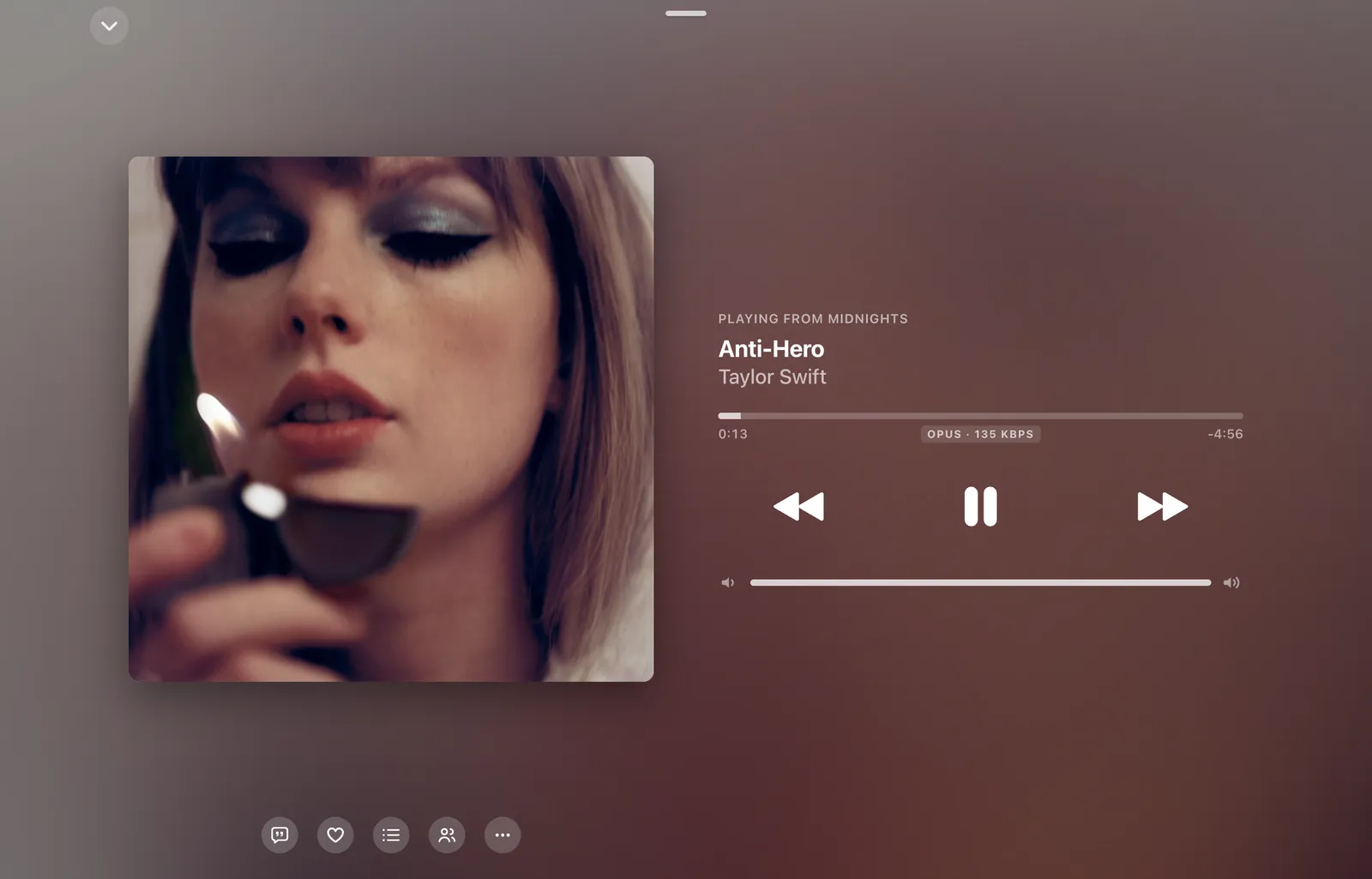
Aurora Music's Now Playing screen with album artwork and playback controls
3desktop platformsone identical interface
8installer formatsdmg · zip · exe · portable · AppImage · deb · rpm
16equaliser presets7 bands, ±12 dB
100%freeno ads · no tracking · GPL-3.0

A closer look

Designed like it belongs on your desktop

Frosted glass, artwork-tinted pages, and a floating tab bar with the mini player riding along. These are real screenshots of the current build.

Aurora Music screenshot

The engine room

Built for people who actually listen

Everything below ships in the current build. The cards are live, so try them.

Word-synced lyrics

Lyrics that breathe with the song

Apple Music-style lyrics with word-level timing from BetterLyrics, LRCLIB and YouTube Music. Words fill as they're sung, distant lines soften, and duets split left and right. Click any line to jump to it.

Hold the line a little longer

every echo coming back stronger

(coming back)

and the room goes quiet

sung in full colour

Crossfade & gapless

Songs that hand over, not stop

The next track is already buffered before this one ends. Set a crossfade and the two overlap on equal-power curves, so the level never dips.

Equaliser

Seven bands, sixteen presets

Seven bands from 60 Hz to 14 kHz, with automatic headroom so boosts never clip. The curve you see is the curve you hear.

Listen Together

One song, every device, the same second

Start a party, share the six-character code, and up to five people hear the same thing in sync. Devices measure their clock offset like NTP and each computes where it should be, so a slow network can't pull anyone off the beat. It speaks BitChord's party protocol, so Android friends can join too.

Party codeAUR0RA
  • MMacBook
  • WWindows PC
  • AAndroid phone

in sync · ±12 ms

Offline & local

Your music, even without Wi-Fi

Download any song with its cover to ~/Music/Aurora Music. Add your own folders of MP3, AAC, FLAC, Opus or WAV, and they play right alongside everything else.

Get LuckyDownloading · 0%
Instant CrushDownloaded
~/Music/FLAC412 local songs

Ecosystem

Your taste, everywhere

Your Discord status shows what you're playing, using Discord's official RPC. Plays scrobble to Last.fm and ListenBrainz once you've actually heard them.

LISTENING TO AURORA MUSIC
Get LuckyDaft Punk
  • Last.fmscrobbled
  • ListenBrainzsubmitted

Release stream

Shipped, not promised

Every build, pulled live from GitHub Releases.

v0.1latest

Aurora Music 0.1

  • Home, Explore, Search and Library, with album, playlist and artist pages tinted from their artwork
  • Now Playing with an animated artwork backdrop, and Apple-style word-synced lyrics
  • Gapless playback, crossfade, a 7-band equaliser, offline downloads and Local Music
  • Listen Together, Discord status, and Last.fm / ListenBrainz scrobbling

Install

Three steps, about a minute

Pick your system. Builds aren't code-signed yet, so each OS asks you to confirm once.

01

Download the .dmg

One universal build runs natively on Apple silicon and Intel Macs.

Download for macOS
02

Drag to Applications

Open the disk image and drop Aurora Music into your Applications folder.

03

Open it once

The first time, right-click the app and choose Open, then Open again. After that it launches normally.

All files for the latest release →

Questions

Good to know

Is it really free?

Yes. There are no ads, no subscription and no tracking. Aurora Music is free software under the GPL-3.0, and the source is on GitHub.

Do I need a YouTube Music account?

No. You can search and play without signing in. Signing in with Google adds your library, liked songs and personalised home feed. Your session stays encrypted in your system keychain.

Where do downloads go?

To Music/Aurora Music in your home folder, each with its cover image beside it. Downloaded songs play from disk automatically, online or offline.

Can I listen together with BitChord users?

Yes. Aurora's Listen Together speaks the same party protocol as BitChord on Android, so anyone connected to the same party server shares the party.

Is it affiliated with YouTube or Apple?

No. Aurora Music is an independent project. It's styled after Apple Music's design language and plays from YouTube Music, but it is not endorsed by or connected to either company.

Ready when you are.

Download Aurora Music